
How to Use Meta’s Click-to-Message Ads for Better Conversions
Meta’s Click-to-Message ads have grown rapidly over the past year, becoming one of the most effective ad formats for brands wanting fast, personal, and high-intent customer interactions. With consumers increasingly preferring communication through WhatsApp, Messenger, and Instagram DMs, this ad format gives businesses a direct line to potential buyers.
As the holiday season approaches, now is the perfect time to understand how to use Meta’s Click-to-Message ads for better conversions and stronger ROI.
Why Click-to-Message Ads Matter for Conversions
Click-to-Message ads allow customers to instantly start a chat with your business. This reduces friction, increases trust, and leads to faster conversions.
Meta’s Q2 earnings report revealed that Click-to-Message ad revenue grew over 40% YoY, driven by website-to-message campaigns and WhatsApp’s rapid adoption across global markets. This surge clearly shows that messaging is becoming the preferred channel for customer decision-making.
Meta Releases a New Festive Season Guide
To help brands prepare for the holiday demand, Meta published a 5-page Festive Season Performance Guide focused on Click-to-Message campaigns.
The guide includes:
- New ad tools and features
- Optimization tips
- Creative recommendations
- High-impact campaign strategies for better conversions
It also links to deeper help pages and tutorials for marketers who want to build advanced setups.
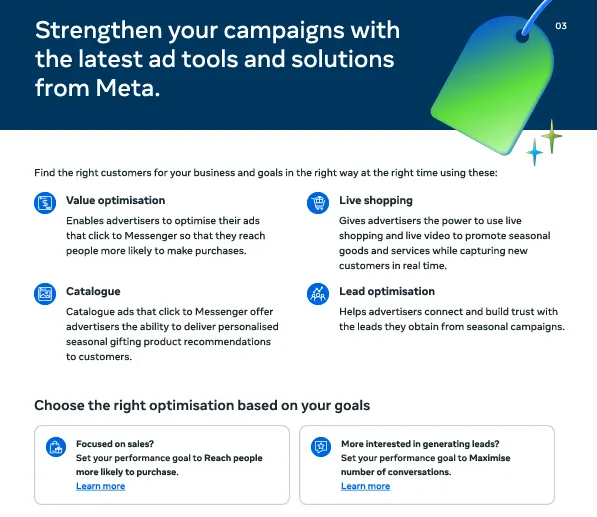
Latest Meta Ad Options to Boost Performance
The guide highlights several updated ad features designed to improve results:
✔ Website-to-Message Ads
Encouraging users to explore your website before initiating a chat, helping generate higher-intent conversations.
✔ Automated Chat Templates
Faster responses and guided messaging flows that help convert leads on autopilot.
✔ WhatsApp & Messenger Integration
Seamless multi-platform support to meet customers where they are most active.
Each feature includes links to detailed explainers so businesses can implement them effectively.
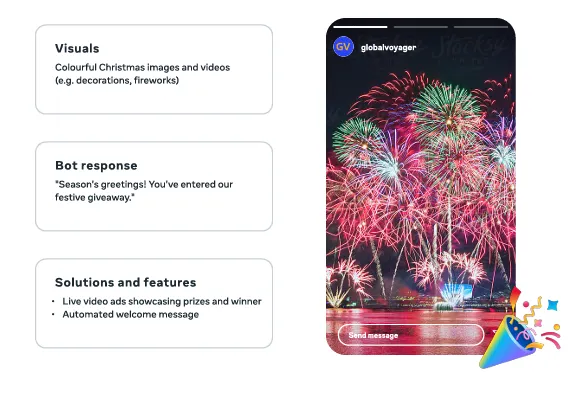
Creative Tips to Improve Click-to-Message Conversions
Meta also shares creative best practices to make your ads more engaging:
- Use clear, benefit-driven headlines
- Show real products and real people
- Add strong CTAs such as “Chat Now” or “Message Us for Offers”
- Highlight limited-time holiday deals
- Keep visuals clean, simple, and thumb-stopping
Following these tips can significantly improve Click-to-Message conversions during high-demand seasons.
Read also: Facebook Adds AI Tools to Marketplace
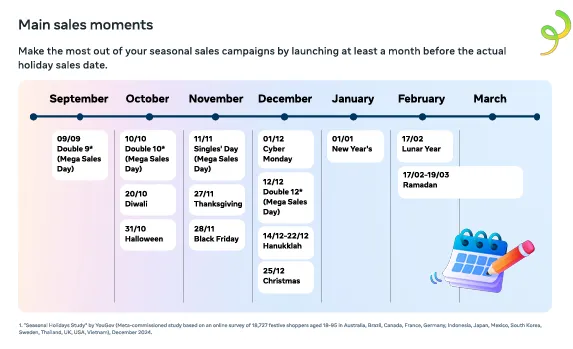
Holiday Calendar & Key Dates for Campaign Planning
The guide includes a helpful list of important festive dates, ensuring brands plan their Click-to-Message ad campaigns around peak buying periods. This helps maximize visibility and conversion rates during the busiest shopping season of the year.
Why You Should Use Click-to-Message Ads This Holiday Season
With messaging becoming the new storefront, brands can use this ad format to:
- Build trust through 1:1 conversations
- Reduce drop-offs with instant replies
- Personalize offers based on customer needs
- Close more sales directly inside chat apps
As more users shift toward WhatsApp and Messenger for business communication, knowing how to use Meta’s Click-to-Message ads for better conversions is essential for competitive holiday marketing.
Final Thoughts
Meta’s Click-to-Message ads are proving to be one of the highest-converting ad formats, especially during the festive season. With the right strategy, optimized creatives, and timely execution, brands can unlock stronger engagement and more sales opportunities through direct messaging.
You can download Meta’s full Click-to-Message Festive Season Guide to explore all features and advanced recommendations.

Soocialhaus is an online media publication dedicated to reporting on the Advertising and Marketing Landscape across Internet in the Social Media World.